
Free English OMNITRONIC MP-180 (01) PDF document. Download the PDF, use the online viewer, or browse the FAQs for easy troubleshooting.
CLICK HERE TO DOWNLOAD OMNITRONIC MP-180 (01) PDF DOCUMENT
If this is not the document you want for this product, click here to see if we have any other documents for this product.
What are the main features of the OMNITRONIC MP-180 PA mono mixing amplifier?
The OMNITRONIC MP-180 is a PA mono mixing amplifier with the following features:
• PA outputs for 70 V or 100 V PA speakers or for low-impedance speakers (4-16 ohms)
• 3 microphone inputs (6.3 mm jack) with separate level controls
• Microphone input 3 with adjustable priority circuit
• 3 line inputs (stereo RCA) with separate level controls
• 1 line output (stereo RCA)
• Chime, switchable
• Treble and bass control for the output signal
• 7-fold LED level display
• Master control for the output signal
• Fan-cooled
• Protection circuits with LED indication: over current, short circuit, turn-on delay
• Rack installation
How do I use the front panel controls on my OMNITRONIC MP-180?
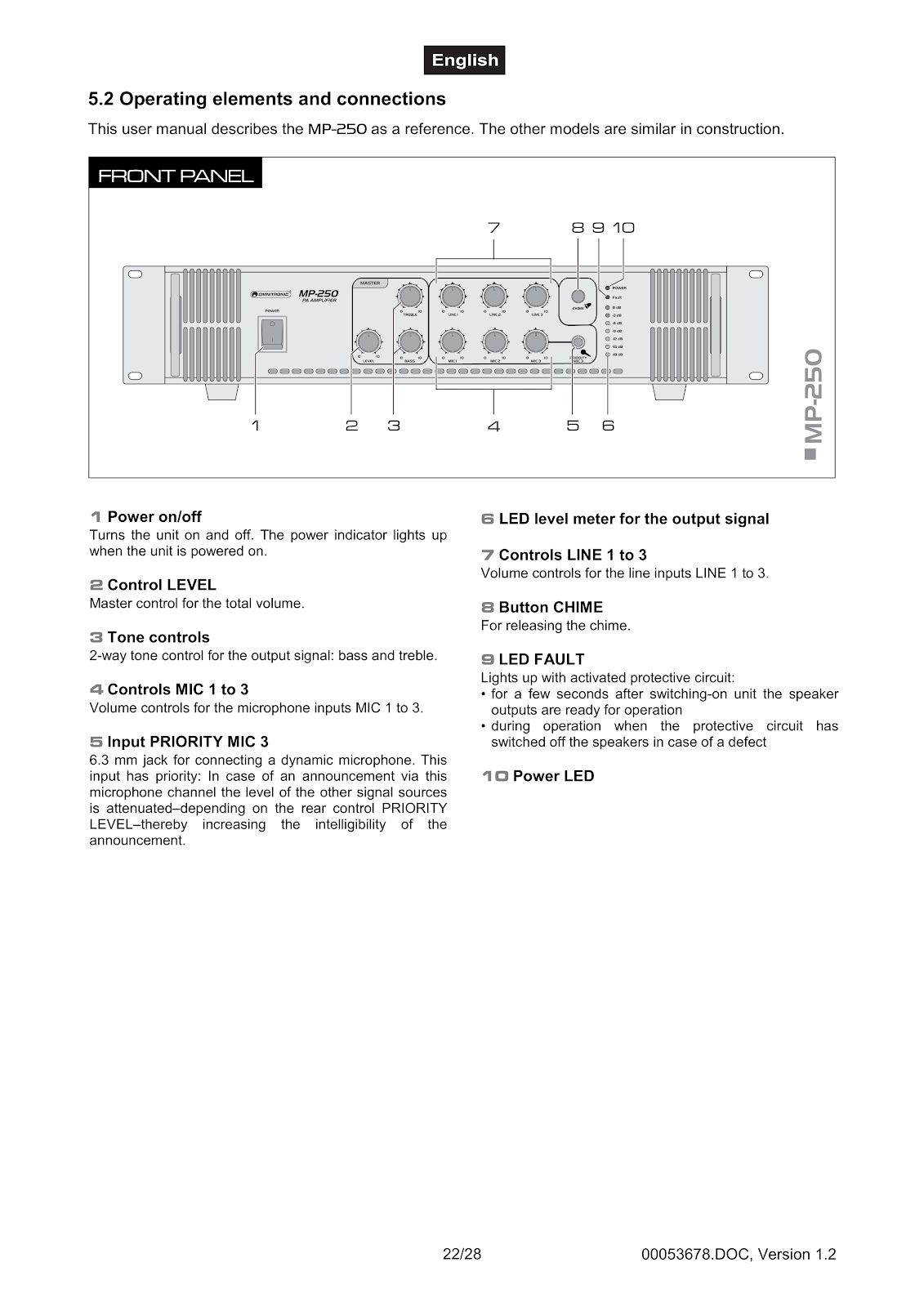
The front panel of the OMNITRONIC MP-180 amplifier has several controls for operation:
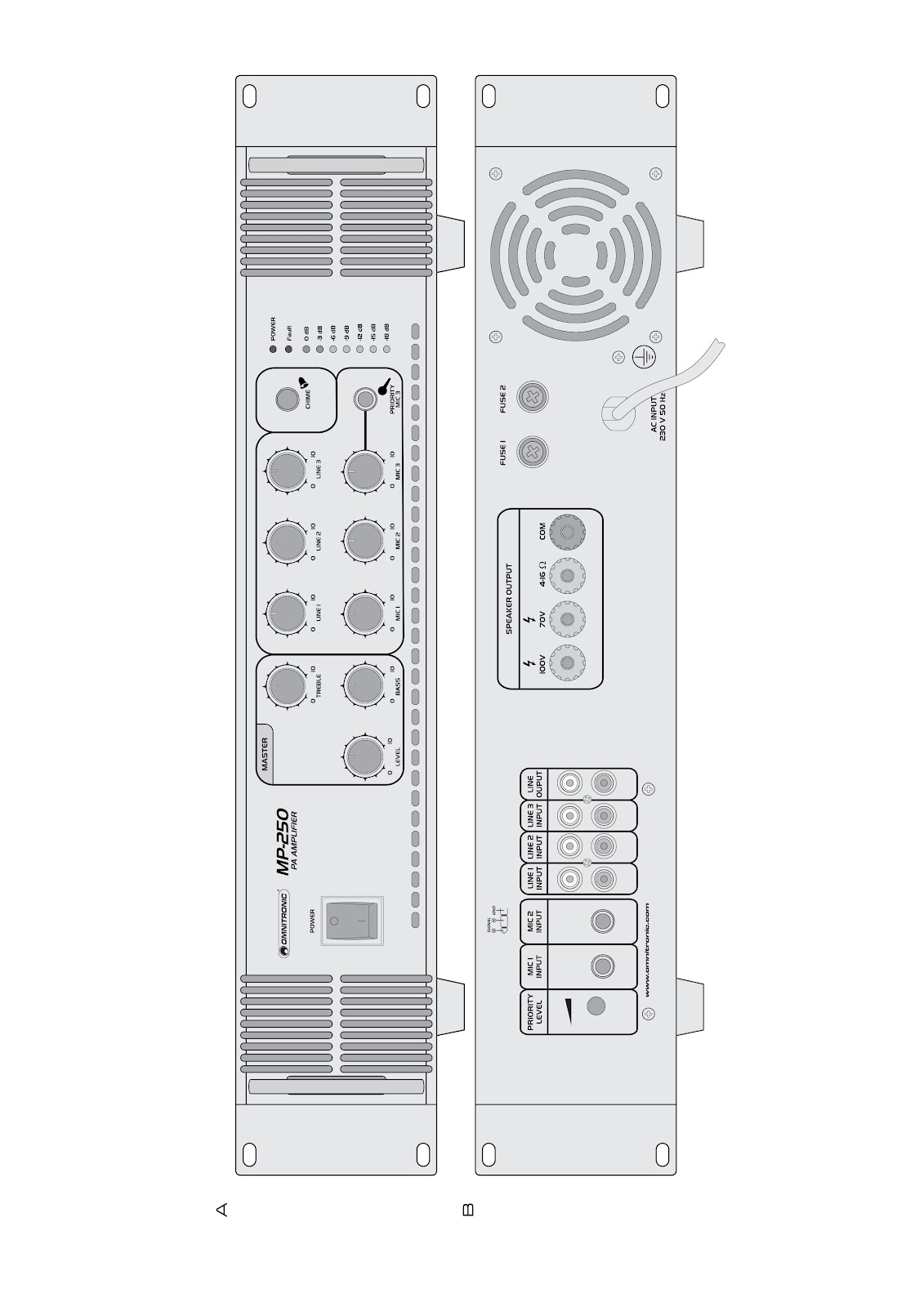
• Power on/off: Turns the unit on and off. The power indicator lights up when the unit is powered on.
• Control LEVEL: This is the master control for the total volume of the amplifier.
• Tone controls: A 2-way tone control for the output signal, allowing you to adjust BASS and TREBLE.
• Controls MIC 1 to 3: Individual volume controls for the microphone inputs MIC 1 to 3.
• Input PRIORITY MIC 3: A 6.3 mm jack for connecting a dynamic microphone. This input has priority; when an announcement is made through this channel, the level of other signal sources is attenuated. The amount of attenuation is determined by the rear PRIORITY LEVEL control.
• LED level meter: Displays the output signal level.
• Controls LINE 1 to 3: Individual volume controls for the line inputs LINE 1 to 3.
• Button CHIME: Press this button to release the chime sound before an announcement.
• LED FAULT: This LED lights up when a protective circuit is activated. It will be on for a few seconds after switching on until the speaker outputs are ready, or during operation if the protective circuit has switched off the speakers due to a defect.
• Power LED: Indicates that the unit is powered on.
What are the connections and controls on the rear panel of the OMNITRONIC MP-180?
The rear panel of the OMNITRONIC MP-180 provides the following connections and controls:
• Control PRIORITY LEVEL: Adjusts the attenuation level for other audio sources when the chime is released or when microphone announcements are made via the PRIORITY MIC 3 channel.
• Inputs MIC 1 and MIC 2: Two 6.3 mm jacks for connecting dynamic microphones.
• Inputs LINE 1 to 3: Stereo RCA inputs for connecting units with line level signals, such as a CD player.
• Output LINE: Stereo RCA output for connection to units with line level inputs, such as an external mixer or amplifier.
• Screw connectors for 70 V and 100 V speakers: Terminals for connecting PA speaker systems.
• Screw connector for 4 to 16 Ω speakers: Terminal for connecting low-impedance speakers.
• Common ground connection COM for all speakers: The common negative terminal for all speaker connections.
• Mains cable: For connection to a mains power outlet.
• Clamping screw: For a potential ground connection.
• Mains fuse 1 and 2: Fuses for electrical protection. Only replace with fuses of the same rating and power as specified on the rear panel, and only when the unit is disconnected from the mains.
How do I install the OMNITRONIC MP-180 in a rack?
The OMNITRONIC MP-180 amplifier is designed for 483 mm (19″) racks. For proper installation, follow these guidelines:
• Use a double-door rack where both front and rear panels can be opened. The rack should have a cooling fan.
• Ensure there is enough space around the amplifier for heated air to pass, preventing overheating.
• Fix the amplifier with four M6 screws in the rack.
• If installing multiple devices, leave at least 1 unit (1 U) of space between them for ventilation.
• Place the heaviest devices, like the amplifier, in the lower part of the rack.
• Fastening the amplifier with only four screws on the front panel is not sufficient. For safety, use additional fastening with ground and side bars.
• If the rack is to be transported, use rear brackets connected to the side or ground bars of the rack to prevent the amplifier from being pushed backwards.
How do I connect speakers to the OMNITRONIC MP-180 amplifier?
You can connect either PA speakers (with transformers) or low-impedance speakers to the OMNITRONIC MP-180. Always turn off the amplifier before making connections.
For PA speakers (70 V or 100 V):
1. Connect the speakers to the terminals COM (negative pole) and either 70V or 100V (positive pole).
2. The total load must not exceed 180 WRMS, otherwise the amplifier may be damaged by overload.
For low-impedance speakers (4-16 Ω):
1. Connect the speakers to the terminals COM (negative pole) and 4-16 Ω (positive pole).
2. When connecting multiple speakers, observe the correct polarity (positive and negative connections). The positive connection on speaker cables is typically specially marked.
The input impedance of the speaker systems should be at least the same or higher than the output impedance of the amplifier.
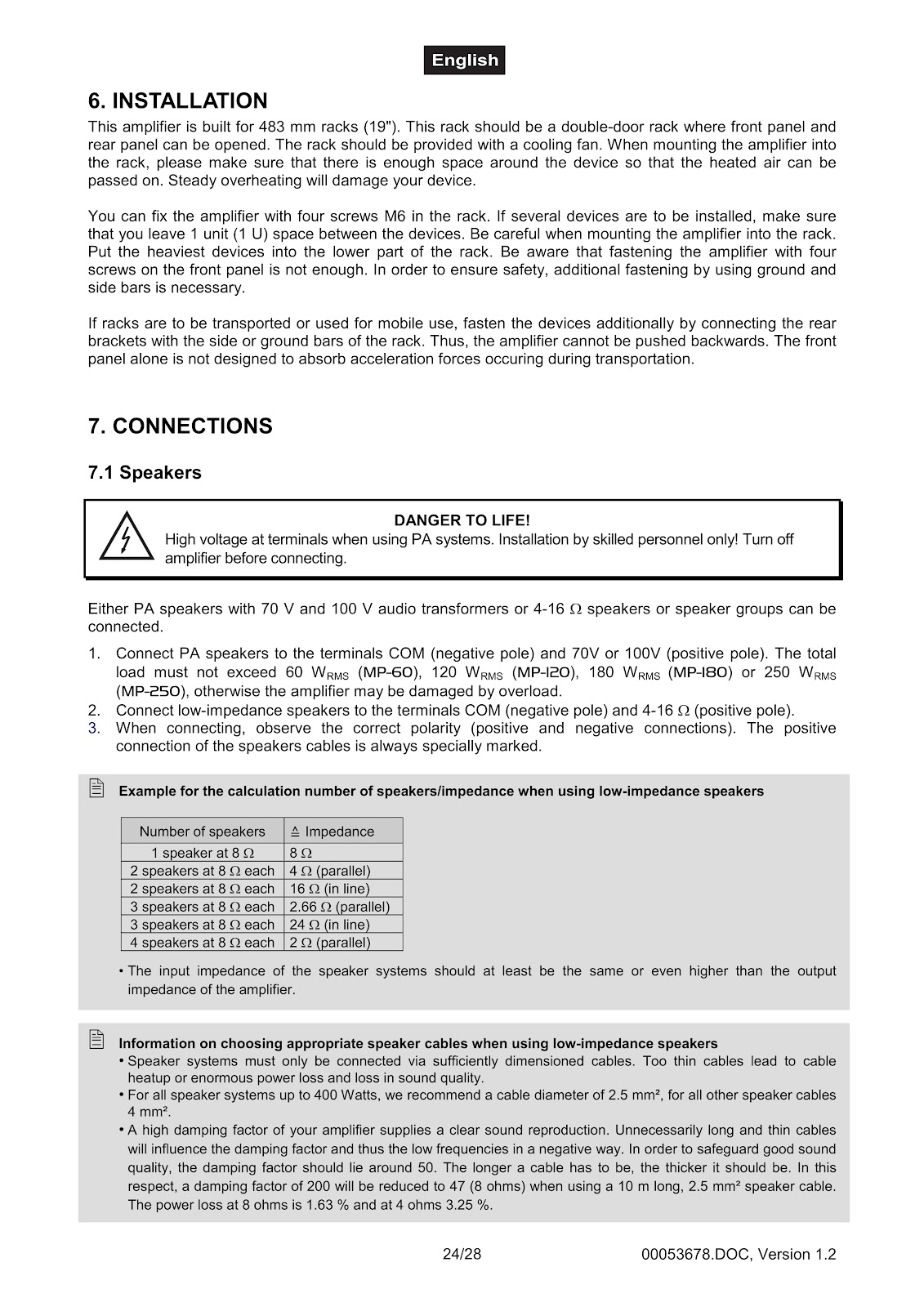
Example calculation for low-impedance speakers:
| Number of speakers | Impedance |
|---|---|
| 1 speaker at 8 Ω | 8 Ω |
| 2 speakers at 8 Ω each | 4 Ω (parallel) |
| 2 speakers at 8 Ω each | 16 Ω (in line) |
| 3 speakers at 8 Ω each | 2.66 Ω (parallel) |
| 3 speakers at 8 Ω each | 24 Ω (in line) |
| 4 speakers at 8 Ω each | 2 Ω (parallel) |
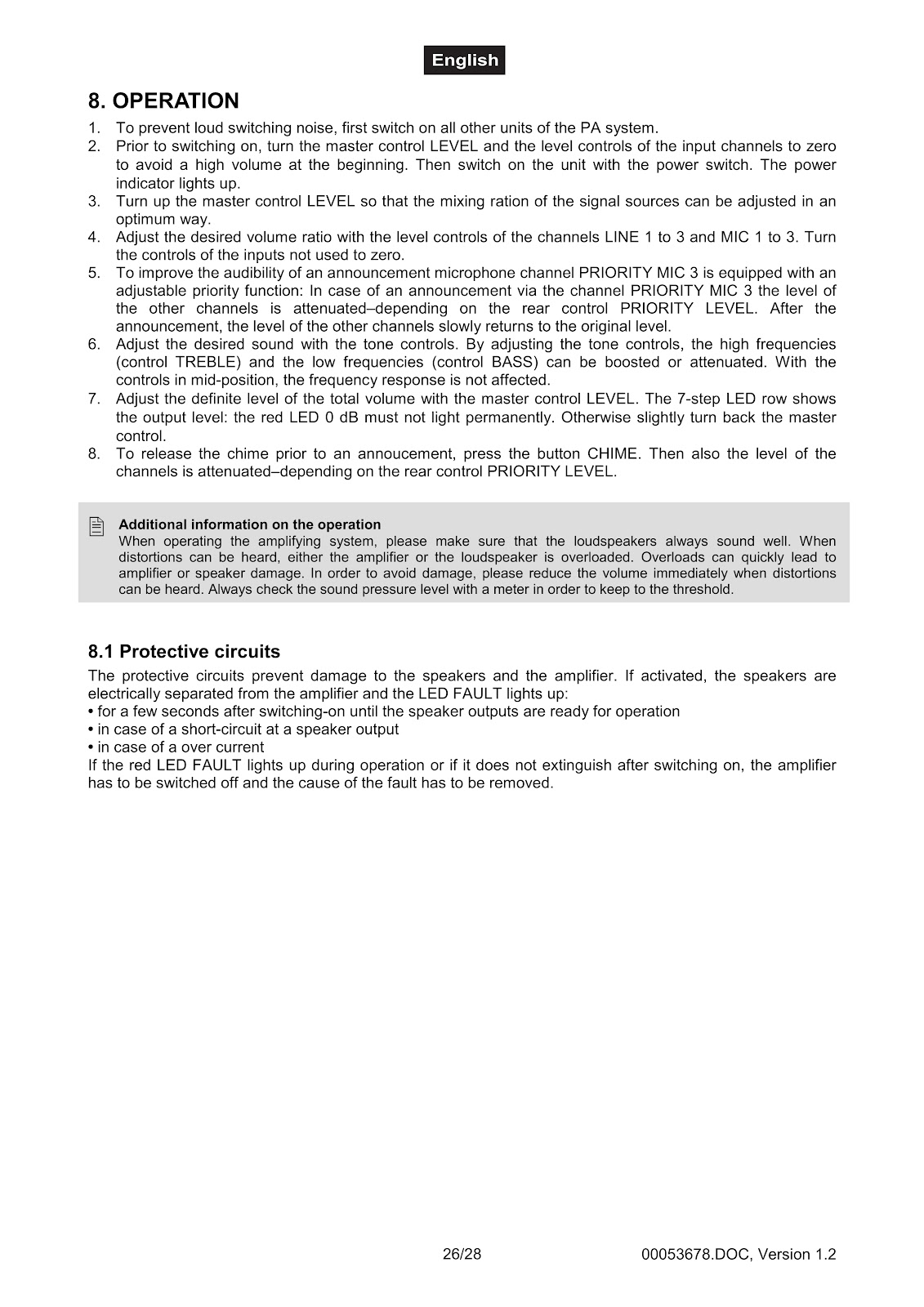
How do I operate the OMNITRONIC MP-180 amplifier?
Follow these steps for proper operation of your OMNITRONIC MP-180:
1. To prevent loud switching noise, first switch on all other units of the PA system before the amplifier.
2. Before switching on the amplifier, turn the master control LEVEL and all input channel level controls to zero to avoid a high volume at the start. Then, switch on the unit with the power switch. The power indicator will light up.
3. Turn up the master control LEVEL so that the mixing ratio of the signal sources can be adjusted optimally.
4. Adjust the desired volume ratio using the level controls for channels LINE 1 to 3 and MIC 1 to 3. Turn the controls of unused inputs to zero.
5. To use the priority function, make an announcement via the PRIORITY MIC 3 input. The level of the other channels will be attenuated depending on the rear PRIORITY LEVEL control setting. After the announcement, the level of other channels will slowly return to the original level.
6. Adjust the sound with the tone controls (TREBLE and BASS). In the mid-position, the frequency response is not affected.
7. Adjust the final total volume with the master control LEVEL. The 7-step LED display shows the output level; the red 0 dB LED should not light permanently. If it does, turn back the master control slightly.
8. To release the chime before an announcement, press the CHIME button. This will also trigger the priority function to attenuate other channels.
What do the protective circuits on the OMNITRONIC MP-180 do?
The protective circuits in the OMNITRONIC MP-180 prevent damage to the speakers and the amplifier itself. When a protective circuit is activated, the speakers are electrically separated from the amplifier, and the red LED FAULT lights up. This occurs in the following situations:
• For a few seconds after switching on, until the speaker outputs are ready for operation.
• In case of a short-circuit at a speaker output.
• In case of an over-current condition.
If the red LED FAULT lights up during operation or does not extinguish after switching on, the amplifier must be switched off, and the cause of the fault must be removed before further use.
How do I troubleshoot common problems with the OMNITRONIC MP-180?
| Problem | Cause | Remedy |
|---|---|---|
| No power. | The power cord is not connected. | Check the power cord and any extension cables. |
| No sound. | • The power cord of the respective device is not connected properly or is defective. • The connection socket or the plug is dirty. |
• Check the power cord and if the plugs are tightly connected with the sockets. • Clean the socket and/or the plug. |
| Fan does not work, LEDs do not light up. | The power cord is not connected. | Please check if the power is available. |
| LED FAULT lights up permanently. | • Inputs receive DC voltage. • Amplifier is overheated due to impurities or heat accumulation. • Impedance of speakers too low. • Short-circuit in speaker connection or in speakers. • Technical default of amplifier. |
• Switch amplifier off and have the device checked by a service technician. • Clean the fan grille. • Provide for sufficient air circulation. • Connect other speakers. • Check speakers. • Switch amplifier off and have the device checked by a service technician. |
How should I clean and maintain my OMNITRONIC MP-180?
Before any maintenance, disconnect the OMNITRONIC MP-180 from the mains power supply.
For cleaning, use a soft, lint-free, and moistened cloth. Never use alcohol or solvents. The device should be cleaned frequently to remove dust and other impurities.
There are no serviceable parts inside the device except for the fuse. All other maintenance and service operations should only be carried out by authorized dealers.
How do I replace the fuse on the OMNITRONIC MP-180?
If the fine-wire fuse of the device fuses, only replace it with a fuse of the same type and rating. Before replacing the fuse, unplug the mains lead.
Procedure:
Step 1: Unscrew the fuseholder from the housing with a fitting screwdriver (anti-clockwise).
Step 2: Remove the old fuse from the fuseholder.
Step 3: Install the new fuse in the fuseholder.
Step 4: Replace the fuseholder in the housing and fix it.
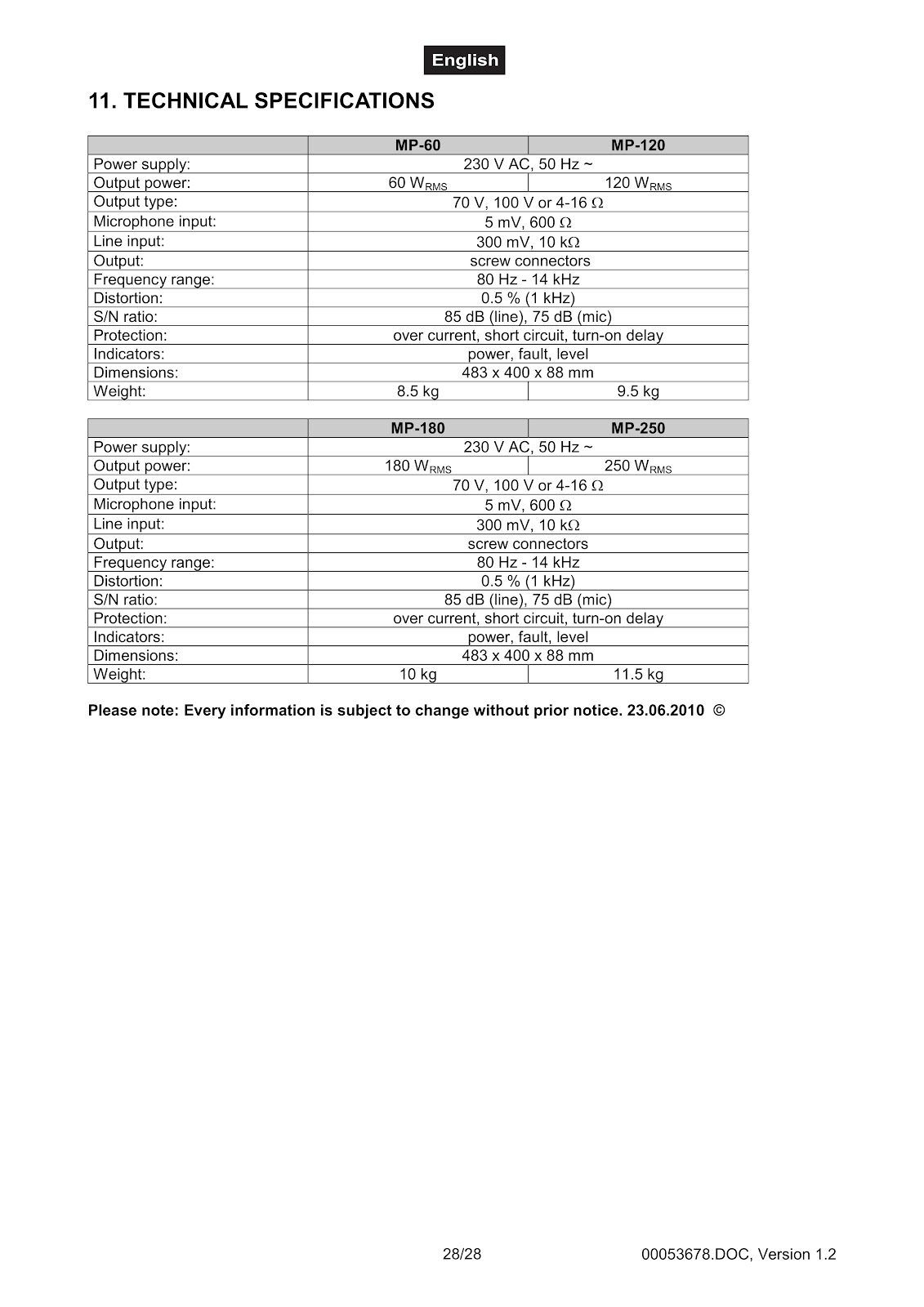
What are the technical specifications for the OMNITRONIC MP-180?
| Power supply: | 230 V AC, 50 Hz ~ |
| Output power: | 180 WRMS |
| Output type: | 70 V, 100 V or 4-16 Ω |
| Microphone input: | 5 mV, 600 Ω |
| Line input: | 300 mV, 10 kΩ |
| Output: | screw connectors |
| Frequency range: | 80 Hz – 14 kHz |
| Distortion: | 0.5 % (1 kHz) |
| S/N ratio: | 85 dB (line), 75 dB (mic) |
| Protection: | over current, short circuit, turn-on delay |
| Indicators: | power, fault, level |
| Dimensions: | 483 x 400 x 88 mm |
| Weight: | 10 kg |
How to use the PDF below:
* Touchscreen: Swipe up/down with-in the PDF to scroll and pinch or spread with two fingers to zoom.
* Mouse: While your mouse is hovering over the PDF, use the mouse wheel to scroll and click on the – / + buttons at the bottom of the PDF to zoom.





CLICK HERE TO DOWNLOAD OMNITRONIC MP-180 (01) PDF DOCUMENT