
Free English OMNITRONIC MP-120 (01) PDF document. Download the PDF, use the online viewer, or browse the FAQs for easy troubleshooting.
CLICK HERE TO DOWNLOAD OMNITRONIC MP-120 (01) PDF DOCUMENT
If this is not the document you want for this product, click here to see if we have any other documents for this product.
What are the main features of the OMNITRONIC MP-120 PA mono mixing amplifier?
The OMNITRONIC MP-120 PA mono mixing amplifier includes the following features:
• PA outputs for 70 V or 100 V PA speakers or for low-impedance speakers (4-16 ohms)
• 3 microphone inputs (6.3 mm jack) with separate level controls
• Microphone input 3 with adjustable priority circuit
• 3 line inputs (stereo RCA) with separate level controls
• 1 line output (stereo RCA)
• Chime, switchable
• Treble and bass control for the output signal
• 7-fold LED level display
• Master control for the output signal
• Fan-cooled
• Protection circuits with LED indication: over current, short circuit, turn-on delay
• Rack installation
What are the general safety instructions for using the OMNITRONIC MP-120?
For your own safety when using the OMNITRONIC MP-120, please follow these instructions:
• Be careful with your operations. With a dangerous voltage you can suffer a dangerous electric shock when touching the wires.
• If the device has been exposed to drastic temperature fluctuation (e.g. after transportation), do not switch it on immediately. The arising condensation water might damage your device. Leave the device switched off until it has reached room temperature.
• This device falls under protection-class I. The power plug must only be plugged into a protection class I outlet. The voltage and frequency must exactly be the same as stated on the device.
• Always plug in the power plug last. The power plug must always be inserted without force. Make sure that the plug is tightly connected with the outlet.
• Never let the power-cord come into contact with other cables. Handle the power-cord and all connections with the mains with particular caution.
• Never modify, bend, strain mechanically, put pressure on, pull or heat up the power cord.
• Make sure that the power-cord is never crimped or damaged by sharp edges.
• Always disconnect from the mains when the device is not in use or before cleaning it.
• There must never enter any liquid into power outlets, extension cords or any holes in the housing of the device.
• There must never be any objects entering into the device. This is especially valid for metal parts.
• Only connect the device when the power switch is off.
• Never connect the inputs or outputs to any power source (batteries, etc.).
• Never connect output to output.
• Before the device is switched on all faders and volume controls have to be set to zero or minimum position.
• Turn the amplifier on last and off first.
• Keep away children and amateurs.
What are the operating determinations for the OMNITRONIC MP-120?
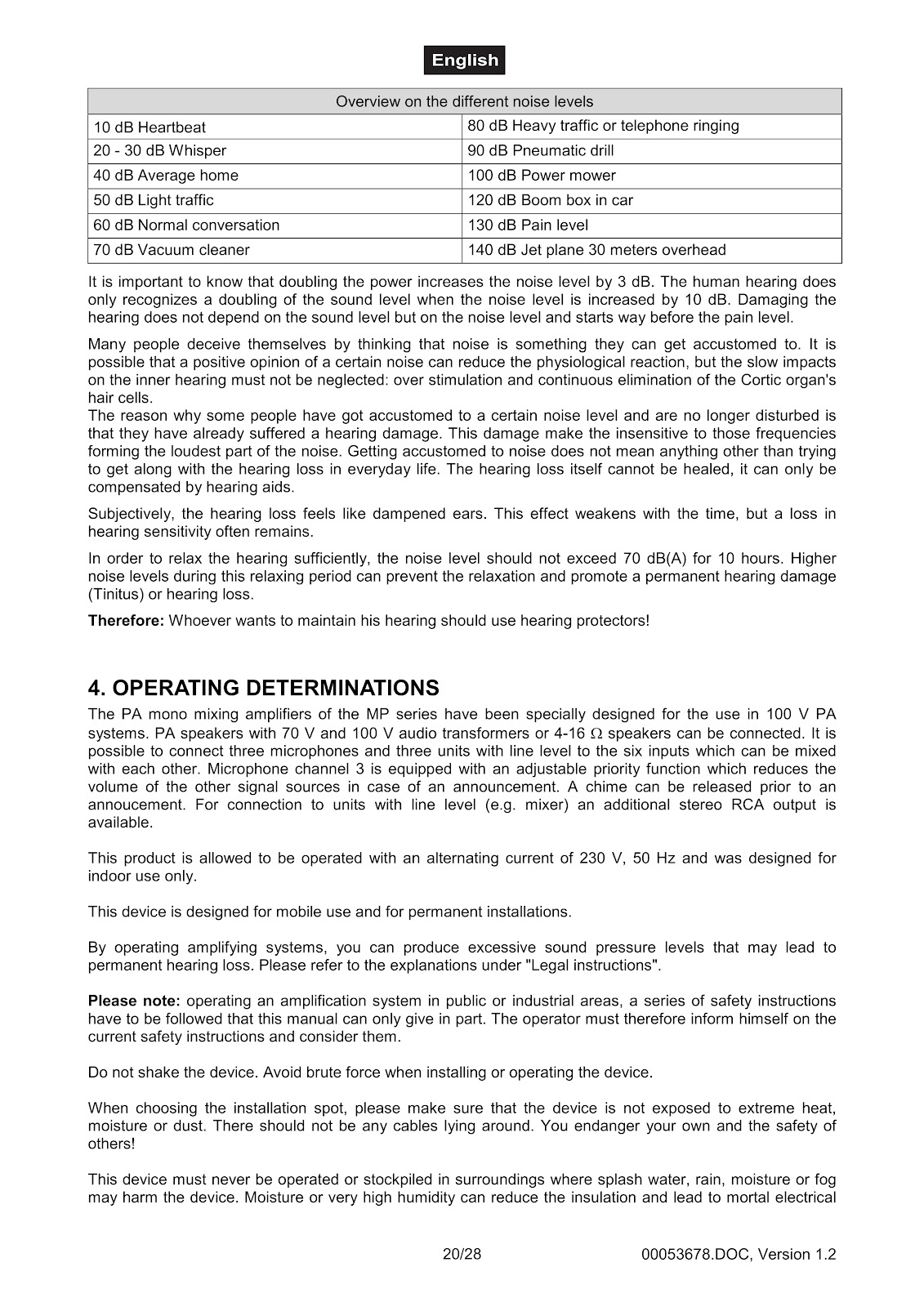
• The OMNITRONIC MP-120 is allowed to be operated with an alternating current of 230 V, 50 Hz and was designed for indoor use only.
• This device is designed for mobile use and for permanent installations.
• Do not shake the device. Avoid brute force when installing or operating the device.
• When choosing the installation spot, please make sure that the device is not exposed to extreme heat, moisture or dust. There should not be any cables lying around.
• The ambient temperature must always be between -5° C and +45° C. Keep away from direct insulation (particularly in cars) and heaters.
• The relative humidity must not exceed 50% with an ambient temperature of 45° C.
• Never use the device during thunderstorms. Over voltage could destroy the device. Always disconnect the device during thunderstorms.
• Operate the device only after having familiarized with its functions. Do not permit operation by persons not qualified for operating the device.
• Never use solvents or aggressive detergents in order to clean the device. Rather use a soft and damp cloth.
• Please use the original packaging if the device is to be transported.
How do I operate the OMNITRONIC MP-120 amplifier?
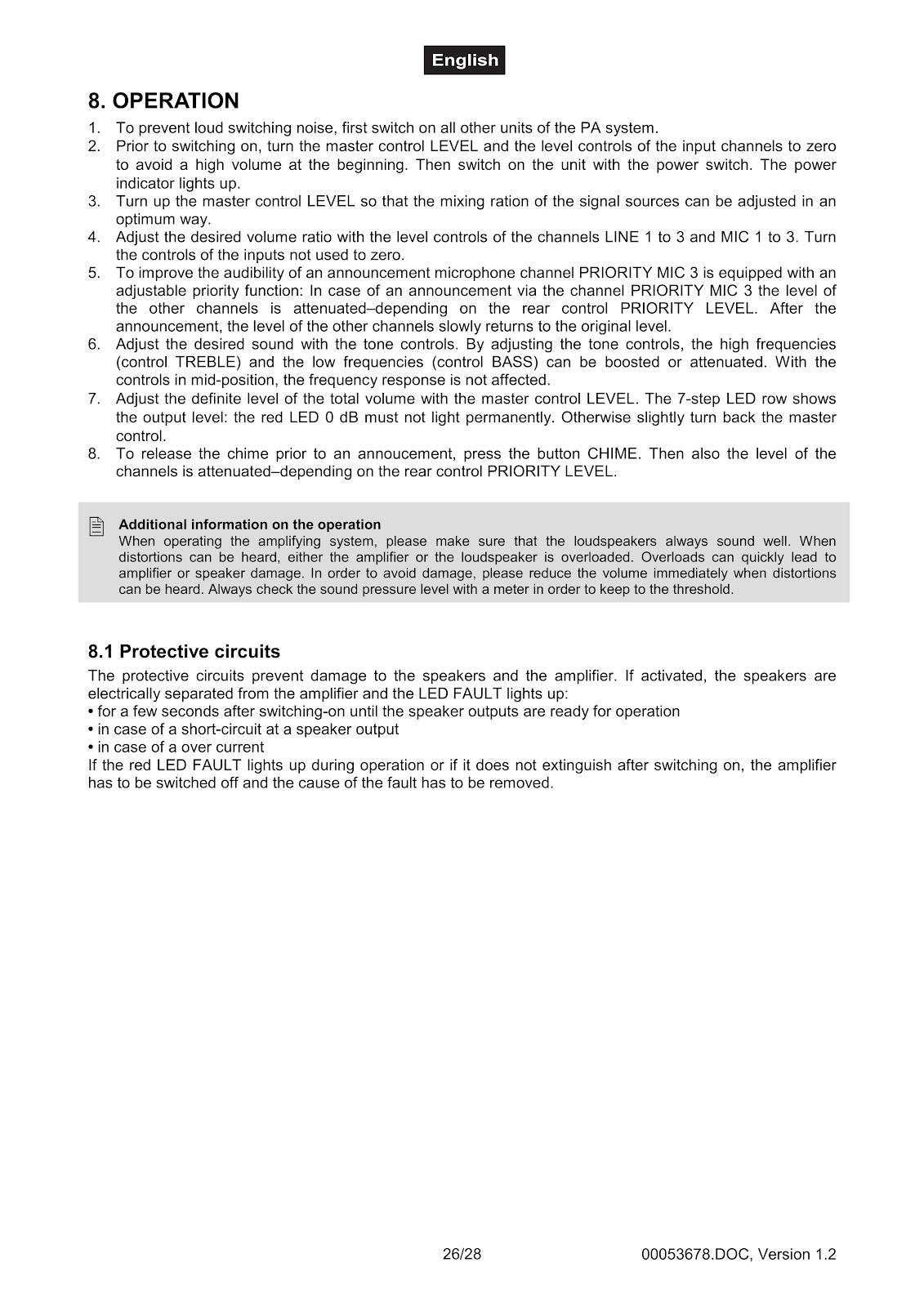
1. To prevent loud switching noise, first switch on all other units of the PA system.
2. Prior to switching on, turn the master control LEVEL and the level controls of the input channels to zero to avoid a high volume at the beginning. Then switch on the unit with the power switch. The power indicator lights up.
3. Turn up the master control LEVEL so that the mixing ration of the signal sources can be adjusted in an optimum way.
4. Adjust the desired volume ratio with the level controls of the channels LINE 1 to 3 and MIC 1 to 3. Turn the controls of the inputs not used to zero.
5. To improve the audibility of an announcement, microphone channel PRIORITY MIC 3 is equipped with an adjustable priority function. In case of an announcement via the channel PRIORITY MIC 3 the level of the other channels is attenuated-depending on the rear control PRIORITY LEVEL. After the announcement, the level of the other channels slowly returns to the original level.
6. Adjust the desired sound with the tone controls. By adjusting the tone controls, the high frequencies (control TREBLE) and the low frequencies (control BASS) can be boosted or attenuated. With the controls in mid-position, the frequency response is not affected.
7. Adjust the definite level of the total volume with the master control LEVEL. The 7-step LED row shows the output level: the red LED 0 dB must not light permanently. Otherwise slightly turn back the master control.
8. To release the chime prior to an announcement, press the button CHIME. Then also the level of the channels is attenuated-depending on the rear control PRIORITY LEVEL.
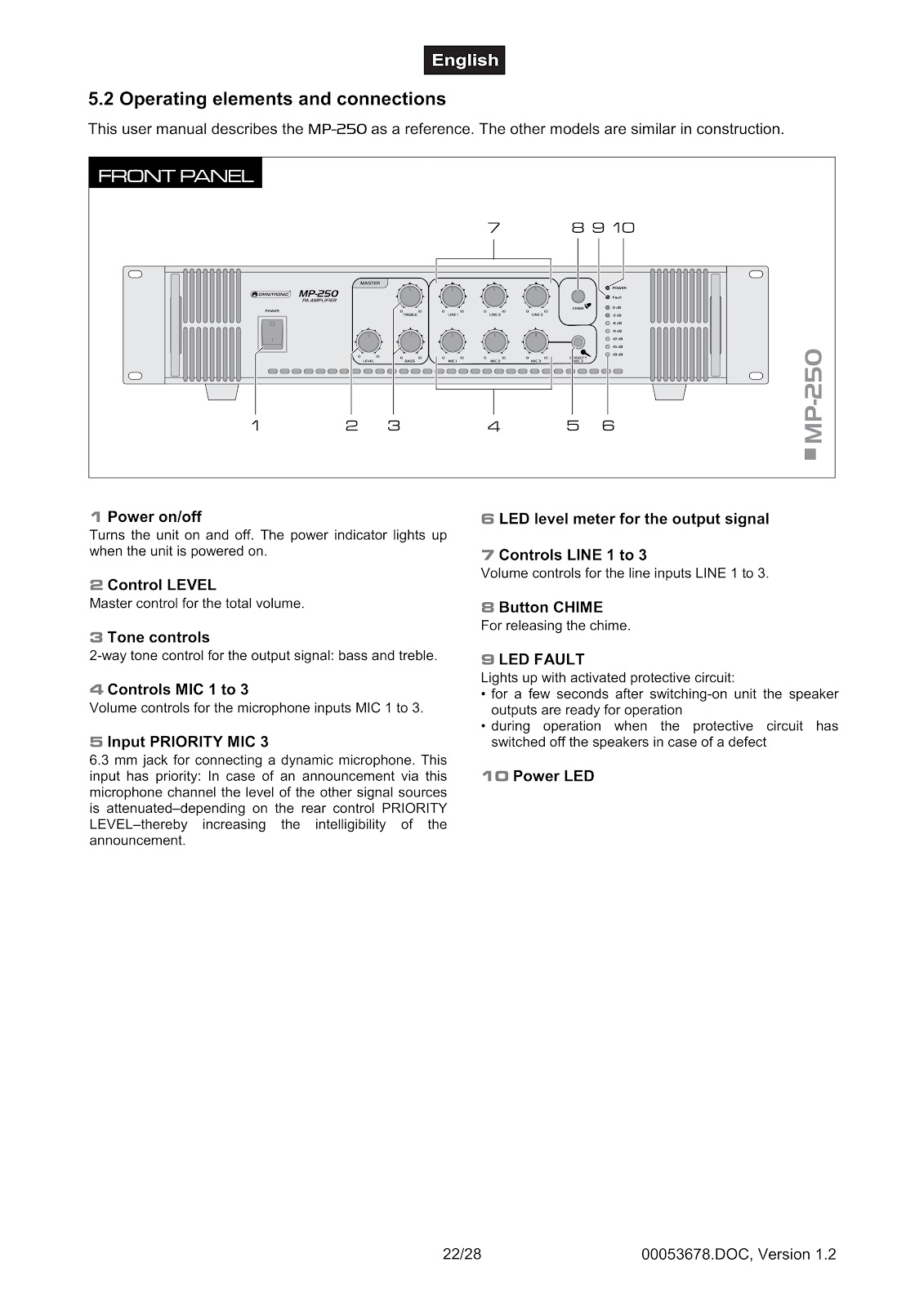
What do the front panel controls on the OMNITRONIC MP-120 do?
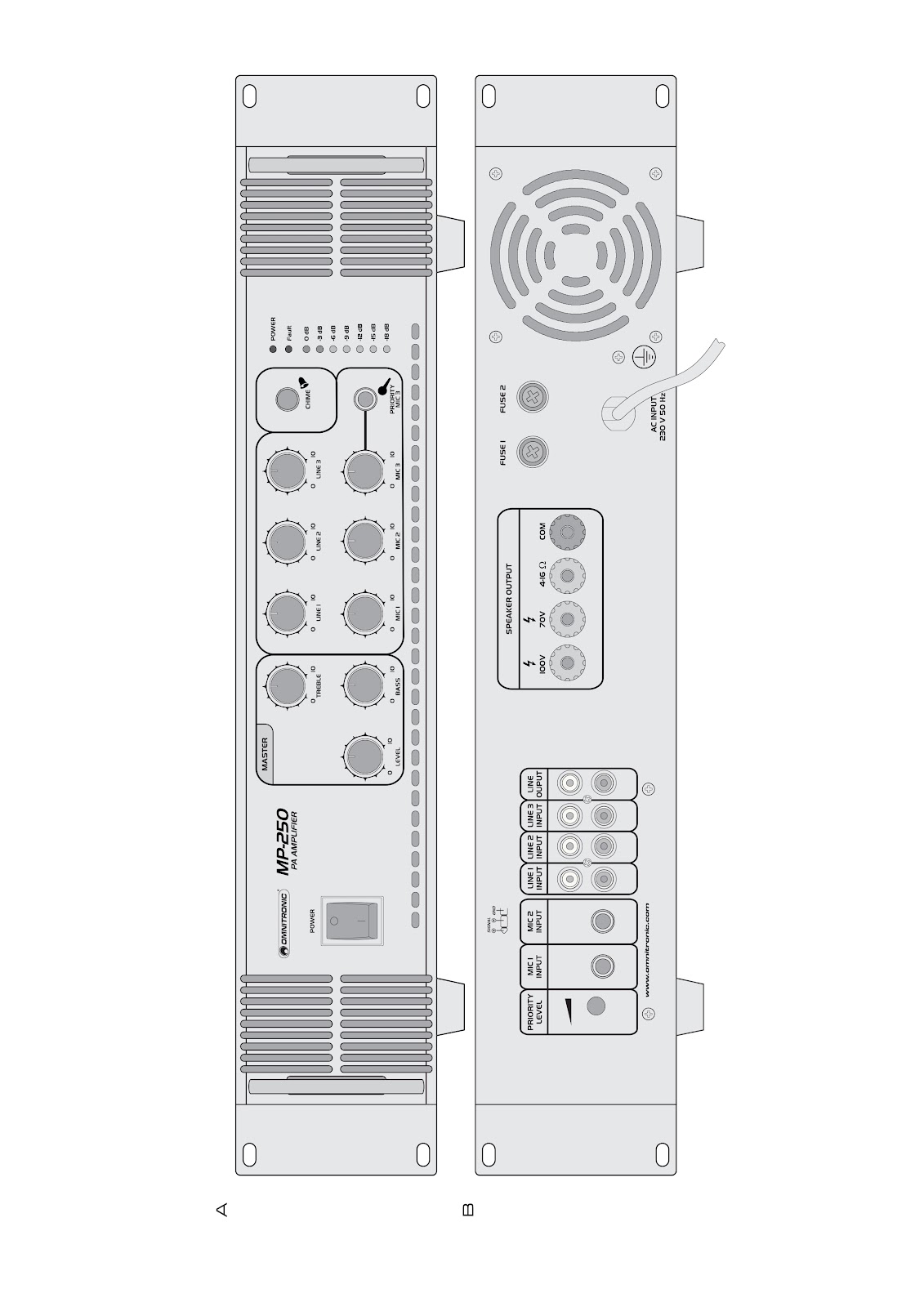
• **Power on/off:** Turns the unit on and off. The power indicator lights up when the unit is powered on.
• **Control LEVEL:** Master control for the total volume.
• **Tone controls:** 2-way tone control for the output signal: bass and treble.
• **Controls MIC 1 to 3:** Volume controls for the microphone inputs MIC 1 to 3.
• **Input PRIORITY MIC 3:** 6.3 mm jack for connecting a dynamic microphone. This input has priority: In case of an announcement via this microphone channel the level of the other signal sources is attenuated-depending on the rear control PRIORITY LEVEL-thereby increasing the intelligibility of the announcement.
• **LED level meter:** For the output signal.
• **Controls LINE 1 to 3:** Volume controls for the line inputs LINE 1 to 3.
• **Button CHIME:** For releasing the chime.
• **LED FAULT:** Lights up with an activated protective circuit: for a few seconds after switching-on unit the speaker outputs are ready for operation, or during operation when the protective circuit has switched off the speakers in case of a defect.
• **Power LED:** This LED indicates that the unit is powered on.
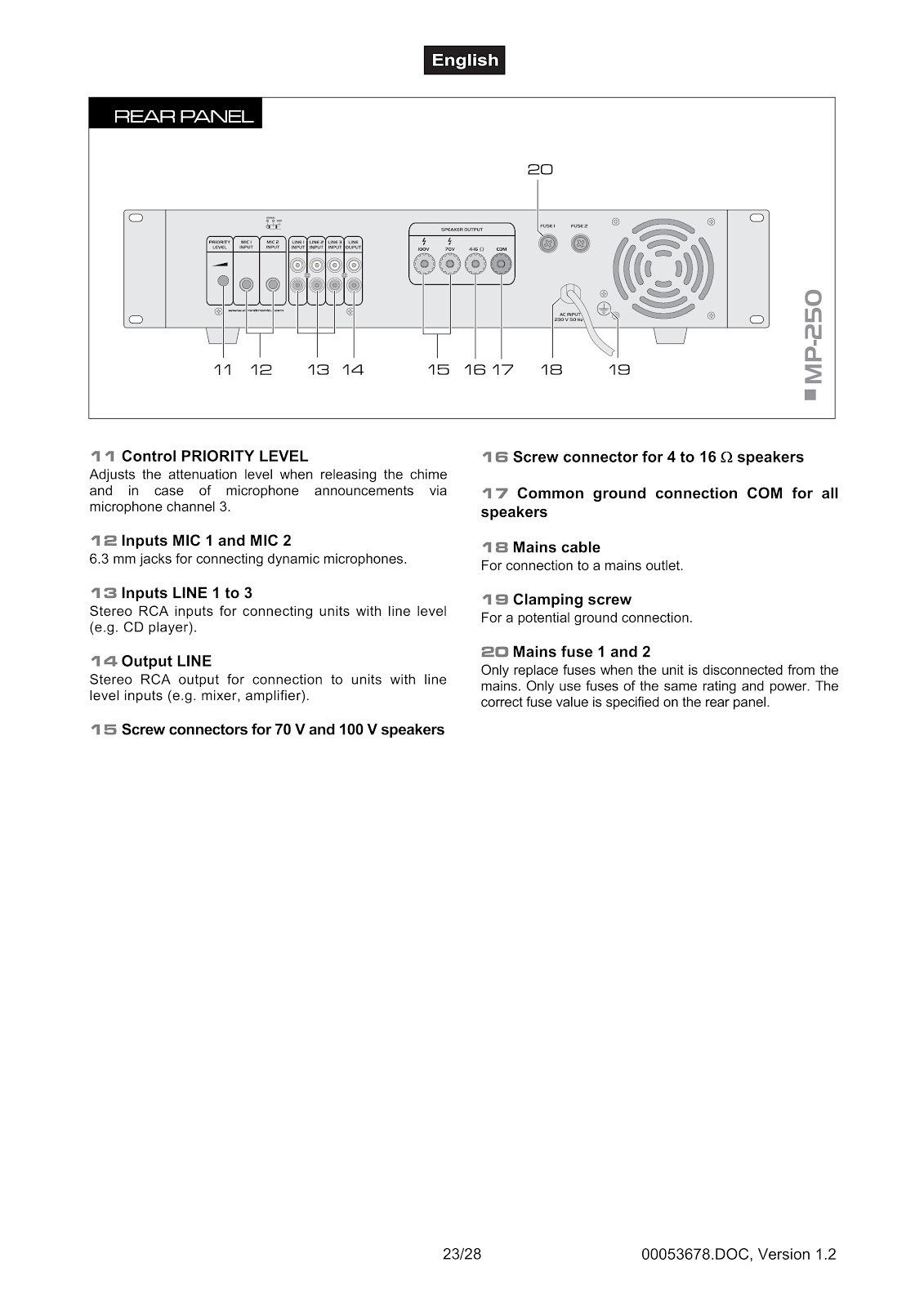
What are the connections on the rear panel of the OMNITRONIC MP-120?
• **Control PRIORITY LEVEL:** Adjusts the attenuation level when releasing the chime and in case of microphone announcements via microphone channel 3.
• **Inputs MIC 1 and MIC 2:** 6.3 mm jacks for connecting dynamic microphones.
• **Inputs LINE 1 to 3:** Stereo RCA inputs for connecting units with line level (e.g. CD player).
• **Output LINE:** Stereo RCA output for connection to units with line level inputs (e.g. mixer, amplifier).
• **Screw connectors for 70 V and 100 V speakers**
• **Screw connector for 4 to 16 Ω speakers**
• **Common ground connection COM for all speakers**
• **Mains cable:** For connection to a mains outlet.
• **Clamping screw:** For a potential ground connection.
• **Mains fuse 1 and 2:** Only replace fuses when the unit is disconnected from the mains. Only use fuses of the same rating and power. The correct fuse value is specified on the rear panel.
How do I connect speakers to the OMNITRONIC MP-120?
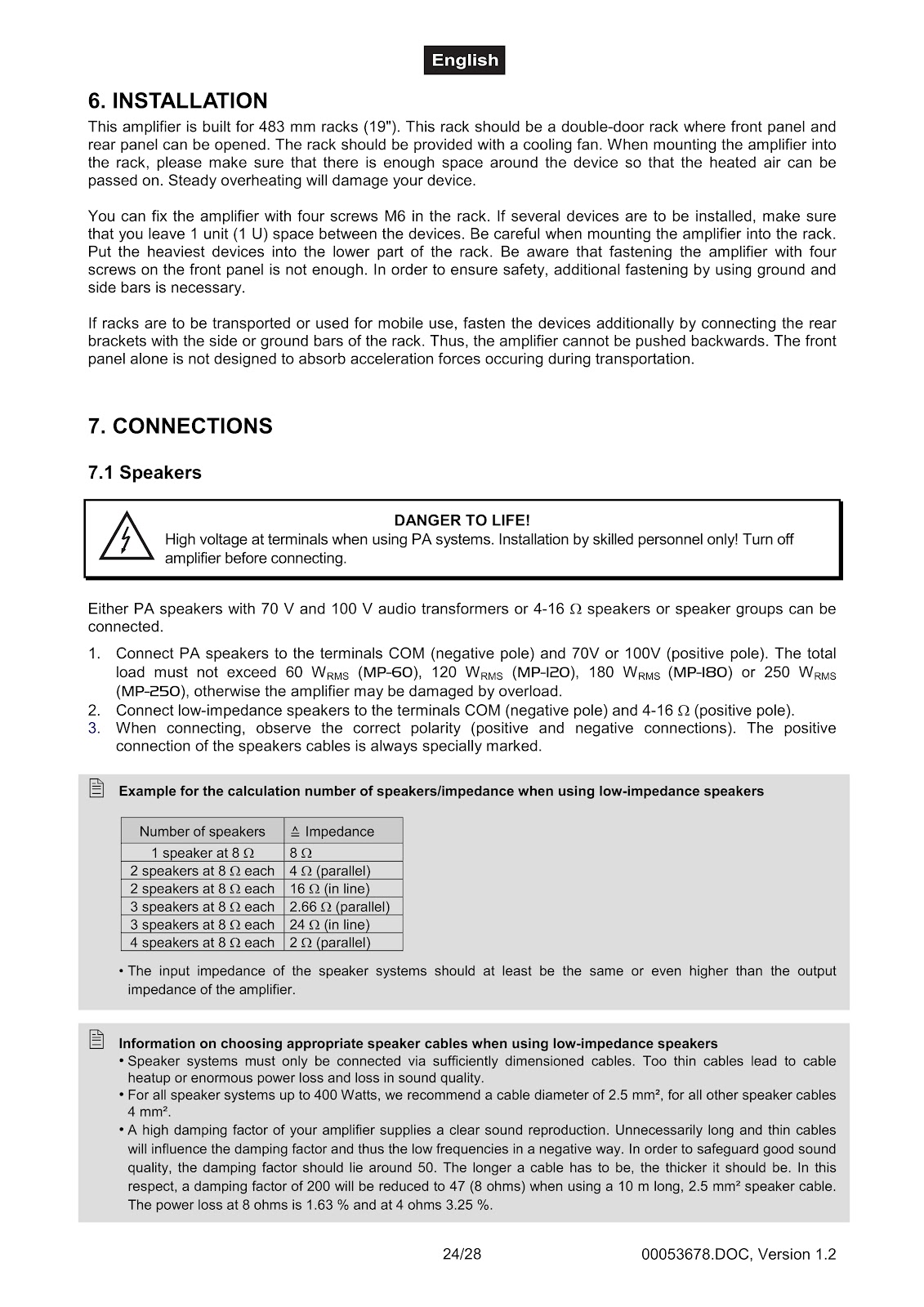
You can connect either PA speakers with 70 V and 100 V audio transformers or 4-16 Ω speakers or speaker groups.
1. Connect PA speakers to the terminals COM (negative pole) and 70V or 100V (positive pole). The total load must not exceed 120 WRMS, otherwise the amplifier may be damaged by overload.
2. Connect low-impedance speakers to the terminals COM (negative pole) and 4-16 Ω (positive pole).
3. When connecting, observe the correct polarity (positive and negative connections). The positive connection of the speaker cables is always specially marked.
What is an example calculation for speaker impedance when using low-impedance speakers with the OMNITRONIC MP-120?
The input impedance of the speaker systems should at least be the same or even higher than the output impedance of the amplifier.
| Number of speakers | Impedance |
|---|---|
| 1 speaker at 8 Ω | 8 Ω |
| 2 speakers at 8 Ω each | 4 Ω (parallel) |
| 2 speakers at 8 Ω each | 16 Ω (in line) |
| 3 speakers at 8 Ω each | 2.66 Ω (parallel) |
| 3 speakers at 8 Ω each | 24 Ω (in line) |
| 4 speakers at 8 Ω each | 2 Ω (parallel) |
What should I consider when choosing speaker cables for low-impedance speakers with the OMNITRONIC MP-120?
• Speaker systems must only be connected via sufficiently dimensioned cables. Too thin cables lead to cable heatup or enormous power loss and loss in sound quality.
• For all speaker systems up to 400 Watts, we recommend a cable diameter of 2.5 mm², for all other speaker cables 4 mm².
• A high damping factor of your amplifier supplies a clear sound reproduction. Unnecessarily long and thin cables will influence the damping factor and thus the low frequencies in a negative way. In order to safeguard good sound quality, the damping factor should lie around 50. The longer a cable has to be, the thicker it should be. In this respect, a damping factor of 200 will be reduced to 47 (8 ohms) when using a 10 m long, 2.5 mm² speaker cable. The power loss at 8 ohms is 1.63 % and at 4 ohms 3.25 %.
How do I connect the OMNITRONIC MP-120 to the mains power?
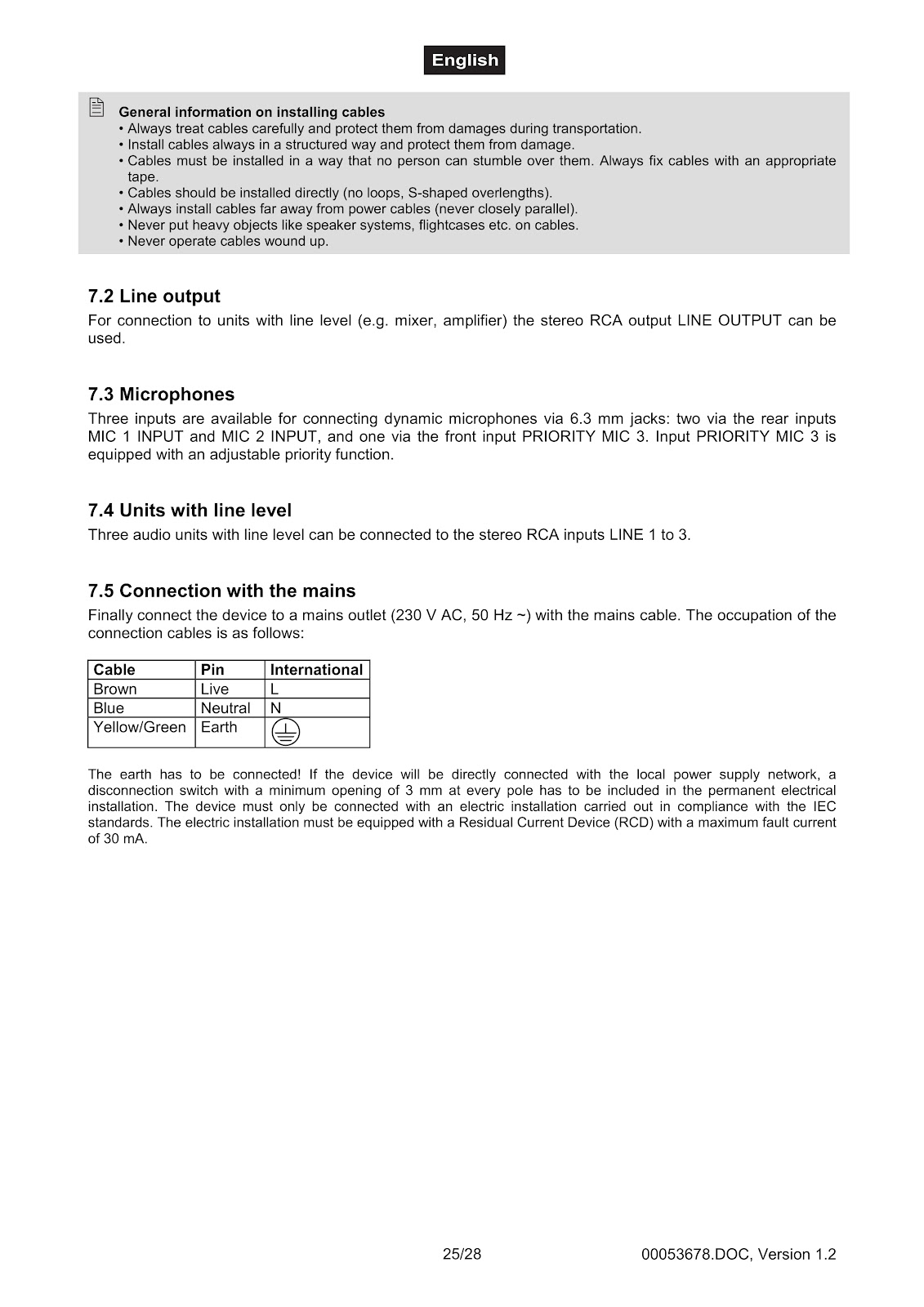
Connect the device to a mains outlet (230 V AC, 50 Hz ~) with the mains cable. The occupation of the connection cables is as follows:
| Cable | Pin | International |
|---|---|---|
| Brown | Live | L |
| Blue | Neutral | N |
| Yellow/Green | Earth | ⏚ |
The earth has to be connected. If the device will be directly connected with the local power supply network, a disconnection switch with a minimum opening of 3 mm at every pole has to be included in the permanent electrical installation. The device must only be connected with an electric installation carried out in compliance with the IEC standards. The electric installation must be equipped with a Residual Current Device (RCD) with a maximum fault current of 30 mA.
What do the protective circuits on the OMNITRONIC MP-120 do?
The protective circuits prevent damage to the speakers and the amplifier. If activated, the speakers are electrically separated from the amplifier and the LED FAULT lights up in the following cases:
• for a few seconds after switching-on until the speaker outputs are ready for operation
• in case of a short-circuit at a speaker output
• in case of an over current
If the red LED FAULT lights up during operation or if it does not extinguish after switching on, the amplifier has to be switched off and the cause of the fault has to be removed.
How do I troubleshoot common problems with my OMNITRONIC MP-120?
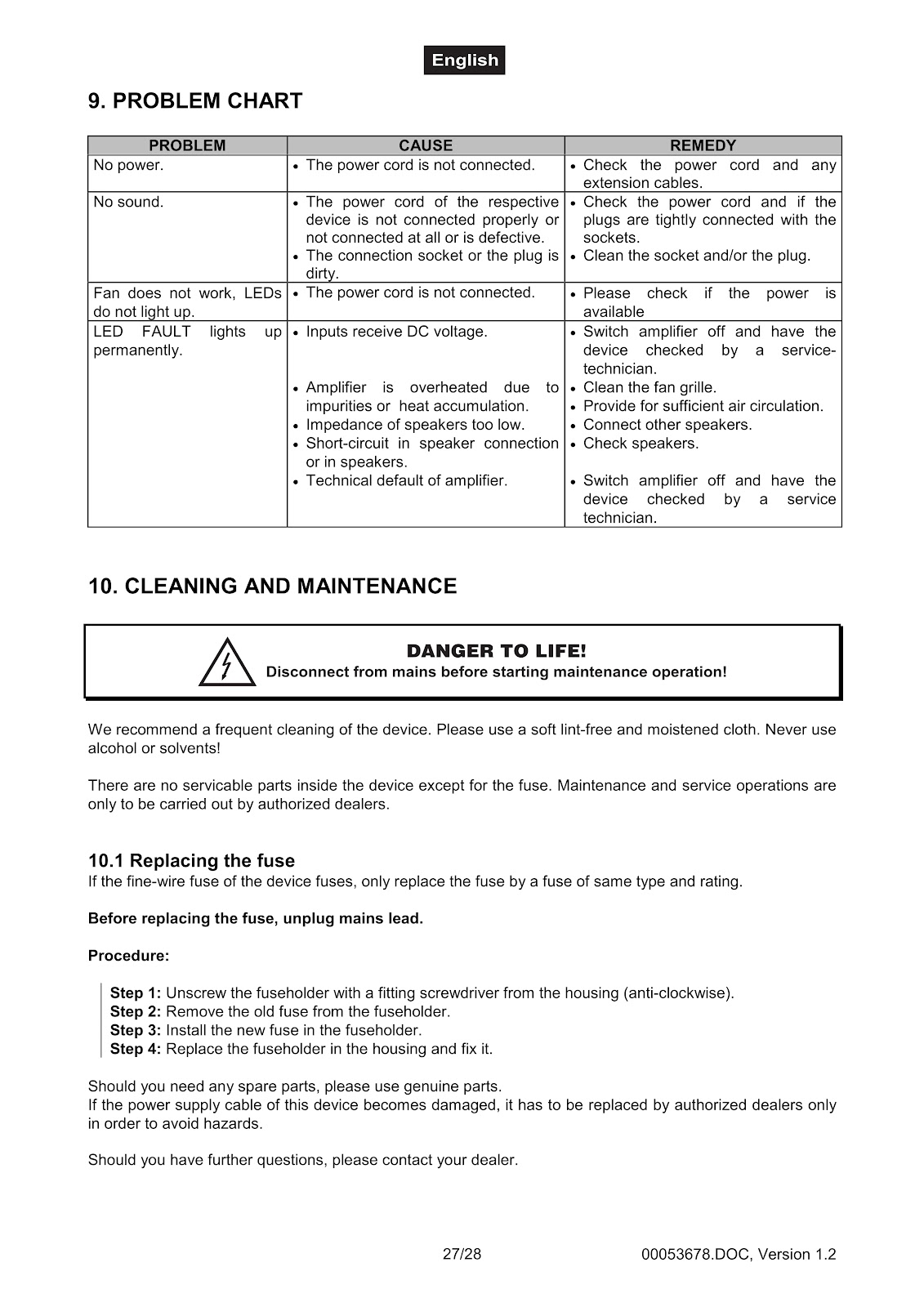
| PROBLEM | CAUSE | REMEDY |
|---|---|---|
| No power. | The power cord is not connected. | Check the power cord and any extension cables. |
| No sound. |
• The power cord of the respective device is not connected properly or not connected at all or is defective. • The connection socket or the plug is dirty. |
• Check the power cord and if the plugs are tightly connected with the sockets. • Clean the socket and/or the plug. |
| Fan does not work, LEDs do not light up. | The power cord is not connected. | Please check if the power is available. |
| LED FAULT lights up permanently. |
• Inputs receive DC voltage. • Amplifier is overheated due to impurities or heat accumulation. • Impedance of speakers too low. • Short-circuit in speaker connection or in speakers. • Technical default of amplifier. |
• Switch amplifier off and have the device checked by a service technician. • Clean the fan grille. • Provide for sufficient air circulation. • Connect other speakers. • Check speakers. • Switch amplifier off and have the device checked by a service technician. |
How do I clean and maintain my OMNITRONIC MP-120?
A frequent cleaning of the device is recommended. Before starting maintenance, disconnect the OMNITRONIC MP-120 from the mains.
Please use a soft lint-free and moistened cloth. Never use alcohol or solvents.
There are no serviceable parts inside the device except for the fuse. Maintenance and service operations are only to be carried out by authorized dealers.
How do I replace a fuse in the OMNITRONIC MP-120?
If the fine-wire fuse of the device fuses, only replace the fuse by a fuse of the same type and rating. Before replacing the fuse, unplug the mains lead.
Procedure:
Step 1: Unscrew the fuseholder with a fitting screwdriver from the housing (anti-clockwise).
Step 2: Remove the old fuse from the fuseholder.
Step 3: Install the new fuse in the fuseholder.
Step 4: Replace the fuseholder in the housing and fix it.
What are the technical specifications for the OMNITRONIC MP-120?
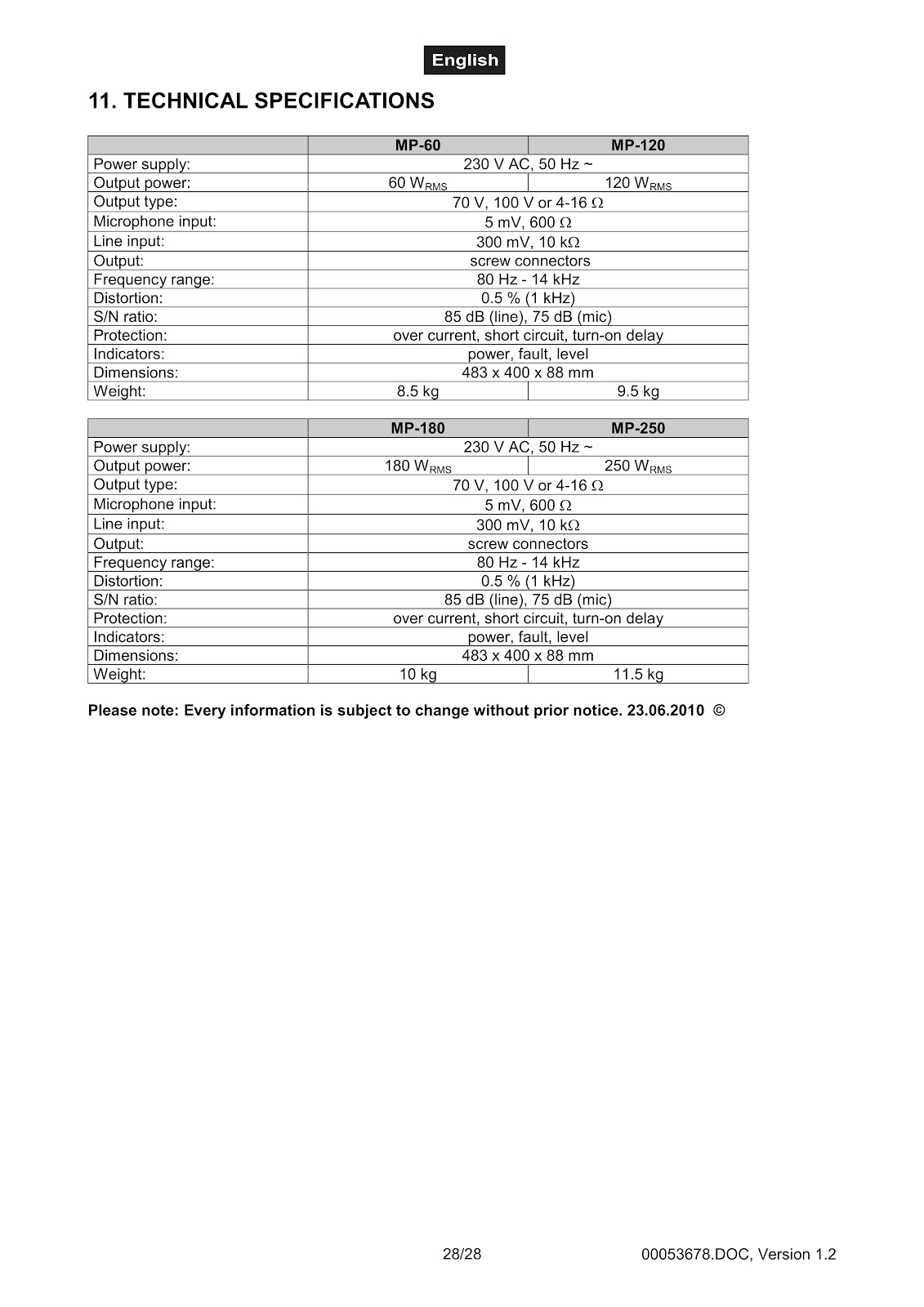
| Power supply: | 230 V AC, 50 Hz ~ |
| Output power: | 120 WRMS |
| Output type: | 70 V, 100 V or 4-16 Ω |
| Microphone input: | 5 mV, 600 Ω |
| Line input: | 300 mV, 10 kΩ |
| Output: | screw connectors |
| Frequency range: | 80 Hz – 14 kHz |
| Distortion: | 0.5 % (1 kHz) |
| S/N ratio: | 85 dB (line), 75 dB (mic) |
| Protection: | over current, short circuit, turn-on delay |
| Indicators: | power, fault, level |
| Dimensions: | 483 x 400 x 88 mm |
| Weight: | 9.5 kg |
How to use the PDF below:
* Touchscreen: Swipe up/down with-in the PDF to scroll and pinch or spread with two fingers to zoom.
* Mouse: While your mouse is hovering over the PDF, use the mouse wheel to scroll and click on the – / + buttons at the bottom of the PDF to zoom.
CLICK HERE TO DOWNLOAD OMNITRONIC MP-120 (01) PDF DOCUMENT